On sites with large product catalogues, faceted navigation often generates more crawlable URLs than the rest of the site combined. How those URLs are handled determines whether search engines spend their budget on pages that matter or waste it on low-value filter combinations. This article covers why filter URLs create problems at scale, the trade-offs between solution approaches, and how to identify combinations worth indexing.
Why faceted navigation is an SEO problem
Faceted navigation helps users narrow large product catalogues through filters: colour, size, price, brand, rating. Each filter combination typically generates a unique URL. On sites with many filter options, this creates exponential URL growth that harms crawl efficiency and dilutes ranking signals.
Combinatorial explosion
A category page with modest filter options generates URL combinations that multiply rapidly:
- 10 colours × 15 sizes × 20 brands = 3,000 filter combinations
- Add 5 sorting options = 15,000 URLs
- Add pagination (10 pages average) = 150,000 URLs
From a single category. A site with 50 categories following this pattern creates millions of crawlable URLs, most serving near-identical or thin content.
Facets versus filters: a useful distinction
Not all filter options deserve equal treatment. A practical framework separates them by intended purpose:
Facets create landing pages with independent search value:
- Product type (running shoes, trail shoes)
- Colour (red, blue, black)
- Brand (Nike, Adidas)
- Material (leather, fabric, synthetic)
- Audience (men's, women's, children's)
Filters refine results for user convenience but don't warrant separate indexed pages:
- Price range
- Availability (in stock, quick delivery)
- Sort order (newest, price low-high)
- Clothing size (size 10, size 12)
- Pack quantity
This distinction simplifies implementation decisions. Facets should generate clean, crawlable URLs with self-referencing canonicals. Filters should either not modify the URL at all, or generate parameter URLs that are blocked from indexing.
The specific criteria depend on your catalogue and search demand. "Under £50" might be a filter for most retailers but a valuable facet for a jewellery site where price-based searches are common.
The three-layer impact
Uncontrolled faceted navigation affects SEO at three levels:
Crawl budget: Googlebot spends requests on low-value filter combinations instead of important pages. A crawler that discovers /shoes/?color=red&size=9&sort=price will request it, even if the content differs trivially from /shoes/. For large sites, this waste compounds: filter URLs can consume the majority of crawl activity. See crawl budget fundamentals for deeper treatment of budget mechanics.
Index bloat: Filter pages that get indexed compete with canonical category pages. Google may index /shoes/?color=red as a separate page, fragmenting the ranking signals that should consolidate on /shoes/. Worse, thin filter combinations (few or no results) can be indexed as low-quality pages, dragging down perceived site quality.
Link equity distribution: Internal links pointing to filter URLs spread equity across variants rather than consolidating on primary pages. Navigation elements, breadcrumbs, and cross-links that reference filtered views dilute the authority that should flow to indexable category pages.
How search engines process filter URLs
Understanding how Googlebot treats parameterised URLs clarifies why certain approaches work and others fail.
Crawling, indexing, and ranking are separate
A page can be:
- Crawled but not indexed: Googlebot fetches it, but quality signals or directives prevent index inclusion
- Indexed but filtered from ranking: The page exists in the index but doesn't surface for queries (thin content, duplicate detection)
- Indexed and ranking: The page competes for search positions
Solutions target different layers. Blocking crawl prevents discovery. Noindex prevents indexing. Canonicals consolidate ranking signals. Mismatching the solution to the problem (blocking crawl when you need to prevent indexing) creates gaps.
How Google handles parameters
Google previously offered a URL Parameters tool in Search Console, allowing site owners to specify how parameters affected content. This tool was deprecated in 2022. Google now relies entirely on signals from the site itself: canonical tags, robots directives, internal linking patterns, and content similarity analysis.
No automated parameter handling exists. Site owners must configure faceted navigation handling explicitly through on-page signals and server configuration.
Solution approaches
Each technique intervenes at a different layer. The right choice depends on filter volume, content differentiation, and implementation constraints.
Non-crawlable link markup
Googlebot discovers URLs by extracting href attributes from anchor elements. Links implemented without standard anchors, or anchors without href, aren't followed.
<!-- Crawlable: Googlebot will discover this URL -->
<a href="/shoes/?color=red">Red</a>

<!-- Non-crawlable: button with JS handler -->
<button type="button" onclick="applyFilter('color', 'red')">Red</button>

<!-- Non-crawlable: span with onclick -->
<span class="filter-link" onclick="applyFilter('color', 'red')">Red</span>

<!-- Non-crawlable: data attribute with JS delegation -->
<span class="filter" data-filter="color:red">Red</span>
Advantages: Filter URLs never enter the crawl queue. Zero budget spent on discovery. No robots.txt rules or canonical tags to maintain. Filter URLs can still exist for bookmarking and sharing without being crawled.
Disadvantages: Non-anchor elements lack native keyboard navigation, focus states, and screen reader semantics. Meeting accessibility requirements demands ARIA roles, tabindex attributes, and careful interaction design. Users with JavaScript disabled see non-functional filters. If filter URLs are linked from external sites, sitemaps, or internal search, Googlebot still discovers them through those paths.
When to use: High filter volume where other solutions create maintenance burden. Filter URLs that should exist for sharing but have no independent ranking value. Must be combined with accessibility accommodations or reserved for audiences where this trade-off is acceptable.
This technique trades SEO efficiency for accessibility complexity. If your audience includes users relying on assistive technology, ensure filter interactions meet WCAG 2.1 AA requirements, or prefer canonical/noindex approaches that preserve standard anchor markup.
Robots.txt blocking
Prevent crawling entirely by disallowing filter URL patterns:
User-agent: *
Disallow: /*?color=
Disallow: /*?size=
Disallow: /*?sort=
Disallow: /*&color=
Disallow: /*&size=
Advantages: Maximum crawl budget savings. Filter URLs are never fetched after initial robots.txt check.
Disadvantages: Robots.txt blocks crawling, not indexing. If filter URLs have inbound links from external sites, Google may annotate them based on anchor text alone, resulting in thin indexed pages you cannot control or even monitor in Search Console (since Google can't crawl them to see noindex directives). Link equity flowing to blocked URLs is wasted.
When to use: True crawl traps with no external links: internal search results, session-based URLs, or filter patterns that cannot possibly have inbound links. Not suitable as the sole solution for standard faceted navigation.
Meta robots noindex
Allow crawling but prevent indexing:
<meta name="robots" content="noindex, follow">Advantages: Pages are removed from the index. Link equity can still flow through the page (with follow or no nofollow directive). Googlebot sees and respects the directive directly.
Disadvantages: Crawl budget is still consumed; Googlebot must fetch pages to see the noindex tag. Requires ongoing crawl to maintain the noindex signal; if pages become unreachable, Google may retain stale index entries. Google may eventually stop following links from pages with noindex. Google has stated that over time, it reduces crawl priority for noindexed pages and may stop following their links entirely.
When to use: Filter pages with some unique content value (user reviews filtered by rating, for instance) but not worth indexing as standalone pages. Situations where you want links on filter pages to pass equity to linked destinations, though be aware that long-term noindex may diminish this benefit.
Canonical tags
Point filter variants to the unfiltered category page:
<!-- On /shoes/?color=red -->
<link rel="canonical" href="https://example.com/shoes/">
Advantages: Consolidates ranking signals on the canonical URL. Pages remain crawlable for discovery and link equity flow. Googlebot understands the relationship between variants.
Disadvantages: Still consumes crawl budget; every variant is fetched. Google treats canonicals as hints, not directives; if filter pages differ substantially from the canonical target, Google may ignore the tag and index the variant anyway. Canonicalising pages with meaningfully different content (different products shown) can backfire.
When to use: Moderate filter volumes. Filter pages that show subsets of the same products as the canonical page. Situations where preserving some crawlability for internal discovery is valuable.
For detailed canonical implementation, see canonicalisation fundamentals.
JavaScript-based filtering (no URL change)
Filters update page content via JavaScript without modifying the URL:
// Filter applies via AJAX, URL remains /shoes/
document.querySelector('[data-filter="color:red"]')
  .addEventListener('click', () => {
    fetchFilteredProducts('color', 'red');
    updateDisplay();
    // URL unchanged
  });
Advantages: No URL proliferation whatsoever. Zero crawl budget impact from filters. Simple conceptual model.
Disadvantages: Filter states aren't bookmarkable or shareable, so users can't link to "red shoes" directly. Browser back button behaviour may confuse users. May not satisfy search intent for queries targeting specific filtered views (someone searching "red nike shoes" expects to land on that filtered view). JavaScript rendering considerations apply to the filtered content.
When to use: Small catalogues where filter combinations don't represent distinct search intents. Filters used as UI convenience rather than navigation. Sites where shareability of filtered views isn't important.
Fragment identifiers (hash URLs)
Filter state is encoded after a # in the URL:
/shoes/#color=red&size=9Fragment identifiers (everything after #) are not sent to the server; they're processed entirely client-side. Googlebot treats /shoes/ and /shoes/#color=red as the same URL.
Advantages: Filter URLs are shareable and bookmarkable. Zero server-side URL proliferation. No crawl budget impact because fragments are invisible to crawlers. No canonical or robots.txt configuration required for filter variations.
Disadvantages: Relies entirely on JavaScript to parse the fragment and render filtered content. Server logs won't show which filter combinations users access because the fragment never reaches the server, making usage analysis difficult. If JavaScript fails, users see the unfiltered page. Some analytics tools also strip fragments by default, complicating conversion tracking.
When to use: Sites prioritising shareability without indexing. High filter volume where log-based analysis isn't critical. Situations where the JavaScript dependency is acceptable. Large marketplaces like Mercado Libre use this approach to maintain shareable filter URLs while preventing fragment variations from consuming crawl budget.
Fragment-based filtering requires JavaScript rendering to function. Test thoroughly with JavaScript disabled to ensure graceful degradation, and configure analytics to capture fragment data if filter usage insights are important.
Selective indexing
Rather than blocking all filter combinations, identify which ones deserve indexing:
- High search volume: Filter combinations matching real queries ("red running shoes") should be indexable
- Distinct content: Filters that surface substantially different products warrant separate pages
- Landing page value: Combinations useful as advertising or campaign landing pages
Allow valuable combinations to be indexed with self-referencing canonicals. Apply noindex or canonicalisation to the rest.
Advantages: Captures search demand for specific filter combinations. Avoids over-blocking pages that could rank and convert.
Disadvantages: Requires search demand data and ongoing analysis. More complex implementation; rules must distinguish valuable from low-value combinations. Maintenance burden as product catalogues change.
When to use: Sites with clear search demand for filtered views. E-commerce catalogues where certain filter combinations represent meaningful product categories. Requires analytical capability to identify valuable combinations. See capturing long-tail traffic for methodology on identifying valuable combinations.
Decision framework
Use this framework to determine how to treat each filter type:
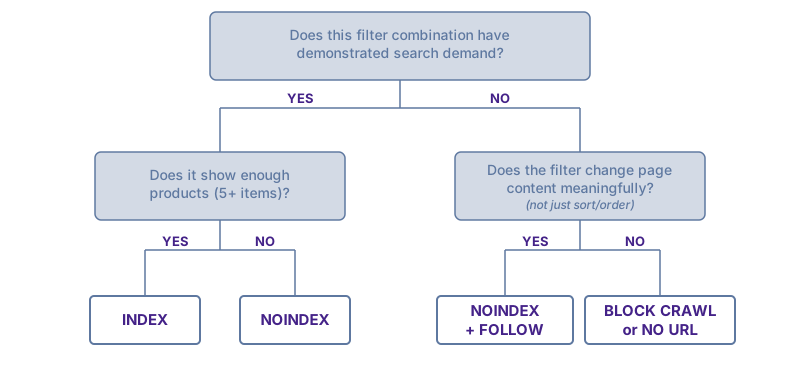
This framework provides a starting point, not rigid rules. Every site has particularities: your CMS constraints, catalogue structure, existing technical debt, and business priorities will shape the right approach. Use the framework to guide initial decisions, then adapt based on your specific context and observed results.
INDEX (self-referencing canonical, include in sitemap, internal link support):
- Brand + category combinations with search volume
- Colour/material filters users search for
- Audience segments (men's, women's)
NOINDEX, FOLLOW (crawlable but not indexed, allows link equity to flow initially):
- Filter combinations showing subset of products without search demand
- Multi-facet combinations creating overly specific pages
- Pages with too few products to be useful
- Note: Google may stop following links from long-term noindexed pages, reducing equity flow over time
BLOCK CRAWL (robots.txt disallow, or no URL generated):
- Sort order parameters
- Pagination beyond page 1 of filtered results
- Session-based or user-specific parameters
- Compound filters with 3+ facets
Using faceted navigation to capture long-tail traffic
Faceted navigation isn't purely a problem to manage. It's a mechanism for capturing search demand that category pages alone cannot satisfy.
The long-tail opportunity
Consider the search volume distribution for a furniture category:
| Query | Monthly searches |
|---|---|
| sofas | 301,000 |
| corner sofas | 165,000 |
| grey corner sofas | 14,800 |
| grey fabric corner sofas | 880 |
A single "sofas" category page cannot rank for all these variations. Each represents distinct user intent, and users searching "grey fabric corner sofas" expect to land on a page showing exactly that, not a page requiring further filtering.
Faceted navigation can generate these pages automatically. The challenge is identifying which combinations have genuine search demand versus which create index bloat.
Identifying valuable filter combinations
Before making faceted URLs indexable, validate search demand:
- Keyword research: Use search tools to find volume for facet combinations (brand + category, colour + category, material + product type)
- Search Console data: Check which filtered URLs already receive impressions or clicks
- Competitor analysis: Review which faceted pages competitors have indexed and ranking
- Site search logs: Internal search queries reveal what combinations users expect to find
Filter combinations worth indexing typically share characteristics:
- Demonstrable search volume (even modest volume compounds across many combinations)
- Sufficient product depth (at least 5–10 products to avoid thin content)
- Distinct user intent (someone searching "vegan running shoes" wants a different page than "running shoes")
Making valuable facets indexable
For filter combinations you want to rank:
- Self-referencing canonical: The page should canonical to itself, not the parent category
- Clean URL structure:
/shoes/red/reads better than?color=redand signals permanence - Unique page elements: Distinct H1, title tag, and ideally introductory content ("Red Running Shoes" not "Running Shoes")
- Internal linking: Include in navigation, breadcrumbs, or category page links; don't rely solely on filter interaction for discovery
- Sitemap inclusion: Add valuable faceted URLs to XML sitemaps
Treat high-value filter combinations as first-class landing pages rather than ephemeral filter states. If a faceted URL deserves to rank, give it the same attention you'd give a hand-built category page.
URL architecture for faceted navigation
Structural decisions made during site architecture reduce faceted navigation problems before they require reactive fixes.
Parameter design
Inconsistent parameter handling creates duplicate URLs:
# These are different URLs serving identical content
/shoes/?color=red&size=9
/shoes/?size=9&color=red
Enforce consistent parameter ordering server-side. Alphabetical ordering is a common convention:
# Canonical parameter order
/shoes/?color=red&size=9
Avoid session IDs, tracking parameters, and other non-content-affecting values in filter URLs. Strip or ignore them at the application level so they don't create distinct crawlable URLs.
Path-based vs parameter-based filters
Filters can be implemented as URL path segments or query parameters:
# Path-based
/shoes/red/size-9/

# Parameter-based
/shoes/?color=red&size=9
Path-based: Produces cleaner, more readable URLs. Creates deeper hierarchy. Harder to block with robots.txt patterns (each segment requires explicit rules). Can imply false hierarchy (is /shoes/red/ a category or a filter?).
Parameter-based: Easier to manage with wildcard robots.txt rules. Less ambiguity about what constitutes a filter. Uglier URLs that may affect click-through rates.
Neither approach is inherently superior. Choose based on how filters map to your information architecture and which blocking patterns you need.
Promoting facets from parameters to paths
A practical strategy combines both URL patterns: start with parameter-based filtering blocked from indexing, then "promote" high-demand combinations to clean path-based URLs.
The workflow:
- Default to parameters: All filter combinations generate parameter URLs (
/shoes/?color=red) that are canonicalised to the parent or blocked from indexing - Monitor demand signals: Track internal site search queries, Search Console impressions for parameter URLs that slip through, and external keyword research
- Promote when justified: When a filter combination shows consistent demand, create a dedicated path-based URL (
/shoes/red/) with proper indexing signals - Redirect or canonical: Point the parameter version to the clean path (
/shoes/?color=red→ 301 →/shoes/red/) to consolidate signals
Why this works:
- Low maintenance default: New filters automatically get parameter URLs without manual configuration
- Evidence-based indexing: You only invest in path-based URLs for combinations with demonstrated value
- Clean separation: Path URLs signal intentional, curated landing pages; parameter URLs signal dynamic filtering
- Gradual rollout: Expand indexed facets over time as you gather data, rather than guessing upfront
This approach is particularly effective for catalogues where search demand patterns aren't obvious initially. Monitor your site search logs. If users repeatedly search for "blue leather sofas", that's a signal to promote /sofas/?color=blue&material=leather to /sofas/blue/leather/.
Pagination interaction
Filter and pagination combinations multiply the problem:
/shoes/?color=red           # Page 1 of red shoes
/shoes/?color=red&page=2    # Page 2 of red shoes
/shoes/?color=red&page=3    # Page 3 of red shoes
Each filter combination spawns its own pagination series.
The rel="next" and rel="prev" link elements were historically used to signal pagination sequences. Google announced in 2019 that it no longer uses these for indexing decisions, though other search engines may still respect them.
Practical approaches:
- View-all pages: Offer a single page showing all products in a filtered set, canonical paginated views to it (if page load performance permits)
- Canonical to page 1: All paginated filter views canonical to the first page of that filter
- Noindex paginated views: Index page 1 of valuable filter combinations; noindex subsequent pages
For sites using infinite scroll, ensure that paginated URL equivalents exist for crawler access. See JavaScript SEO for infinite scroll implementation guidance.
Diagnosing faceted navigation problems
Search Console coverage signals
The Index Coverage report reveals faceted navigation issues:
- "Discovered – currently not indexed": Google found filter URLs (through internal links or sitemaps) but chose not to index them. This often indicates thin content or duplicate detection working correctly, but high volumes suggest crawl waste.
- "Crawled – currently not indexed": Google fetched filter pages but quality signals prevented indexing. Examine whether these pages should be blocked from crawl entirely.
- "Duplicate, Google chose different canonical": Filter URLs being deduplicated against canonical targets. Confirm Google selected the correct canonical.
Log file analysis
Server logs reveal actual crawl behaviour:
- Calculate ratio of filter URL requests to category page requests; if filters dominate, crawl budget is misallocated
- Identify which filter patterns receive most crawl attention
- Detect filter combinations you didn't know were being crawled (external link discovery)
See log file analysis for methodology and tooling.
Index sampling
Estimate indexed filter pages with site: searches:
site:example.com inurl:?color=
site:example.com inurl:?sort=
site:example.com inurl:&size=
Sample indexed filter pages directly. Check content quality: are these thin pages with few products? Duplicate content? Pages that shouldn't exist in the index indicate gaps in your faceted navigation controls.
The site: operator provides rough estimates, not accurate counts. Result numbers fluctuate between searches, and the operator sometimes fails to surface pages that are definitely indexed. Use site: searches for directional insight and spot-checking specific URL patterns, not as a definitive measure of index size. For reliable indexing data, use Search Console's Index Coverage report.
Analytics distortion
Faceted navigation doesn't just affect crawlers. It also distorts your analytics data.
Inflated pageview counts: If /shoes/, /shoes/?color=red, and /shoes/?sort=price are tracked as separate pages, your "most viewed pages" report shows fragmentary data. The true engagement with your shoes category is split across dozens of URLs.
Muddied conversion paths: Users filtering products generate multiple pageviews for what's conceptually a single page visit. Attribution models and funnel analysis become unreliable when filter interactions create new page entries.
Unreliable A/B testing: If test variants are served across multiple filter URLs, sample sizes get diluted and results become harder to interpret.
Solutions:
- URL parameter handling in GA4: Configure parameter exclusions so that
?color=redand?sort=priceconsolidate under the canonical URL in reports - Regex filters: Create content groups that aggregate filter variations under their parent category
- Canonical URL tracking: Configure analytics to report the canonical URL rather than the actual URL (requires implementation work)
Check your top pages report. If filtered URLs appear as high-traffic pages, your analytics configuration needs adjustment. You're likely making decisions based on fragmented data.
Common implementation errors
Blocking crawl to pages with inbound links: When external sites link to filter URLs, Google discovers them regardless of robots.txt. The pages get annotated based on anchor text and external signals, but you can't see them in Search Console or apply noindex tags. Result: uncontrollable thin pages in the index.
Canonicalising to non-existent URLs: Pointing filter pages to canonical URLs that 404 or redirect creates orphaned signals. Verify canonical targets exist and return 200.
Inconsistent application: Handling colour filters but ignoring size filters, or applying rules to some categories but not others. Audit all filter patterns across the site.
Over-blocking valuable combinations: Blanket noindex on all filter URLs prevents ranking for queries like "blue nike running shoes" that your filter pages could satisfy. Analyse search demand before deciding what to block.
Noindex plus robots.txt block: Blocking crawl to a page that also has a noindex tag is redundant at best. Google can't see the noindex if it can't crawl. If you're blocking crawl, the noindex is invisible. Pick one approach per URL pattern.
Parameter ordering inconsistency: Allowing both ?color=red&size=9 and ?size=9&color=red to exist doubles your filter URL footprint. Enforce canonical parameter ordering at the application layer.
Handling empty filter results
Filter combinations that return zero products create a distinct problem. Users who land on these pages find nothing useful. Search engines that index them see thin content.
The soft 404 problem: A page returning HTTP 200 but displaying "No products found" behaves like an error page without signalling that status. Google treats these as low-quality pages, and at scale, thousands of soft 404s can drag down perceived site quality.
Solutions for empty filter combinations:
- Return 404: If a filter combination has no products and unlikely to have products, return a genuine 404 status. This signals clearly that no content exists.
- Noindex dynamically: If stock fluctuates, apply noindex when product count falls below a threshold (e.g., fewer than 3 products). Remove noindex when stock returns.
- Redirect to parent: For permanently empty combinations, 301 redirect to the nearest populated parent category.
- Prevent URL generation: The cleanest solution is to not create URLs for filter combinations with no matching products. If users can't navigate to it, crawlers won't discover it.
Monitor Search Console for "Soft 404" reports in the Page Indexing section. A spike often indicates filter combinations generating empty results pages.
Managing obsolete filter pages
Product catalogues change. Brands get discontinued, colours go out of season, categories get restructured. Filter pages that once had products become empty or irrelevant.
The problem: Obsolete faceted URLs may have accumulated backlinks, internal links, or search visibility. Simply removing them loses that equity and creates broken links.
Recommended approach:
- Identify obsolete facets: Regular crawls comparing indexed filter URLs against current product availability
- Assess value: Check Search Console for impressions/clicks and backlink profiles for external links
- 301 redirect: Point obsolete faceted URLs to the nearest relevant parent or alternative.
/shoes/discontinued-brand/→/shoes/ - Update internal links: Remove or update any navigation, breadcrumbs, or content links pointing to obsolete facets
- Monitor: Track redirected URLs in Search Console to confirm Google processes the redirect
For facets likely to return (seasonal products, temporarily out-of-stock brands), consider keeping the URL with a noindex tag rather than redirecting. This preserves the URL structure for when products return.
How AI-driven search affects faceted navigation
Search engines increasingly rely on entity understanding and semantic interpretation rather than exhaustive URL crawling. This shift has implications for faceted navigation strategy.
From URL discovery to entity recognition
Traditional search required crawling every URL variation to understand what products existed in each combination. Modern systems can infer product attributes from structured data, internal linking patterns, and page content, reducing dependence on discovering every filter permutation.
What this means for faceted navigation:
- Canonical signals matter more: With less exhaustive crawling, clear canonical declarations carry more weight. Conflicting or inconsistent canonicals are more likely to cause problems.
- Internal linking as navigation map: The pages you link to from category pages signal which filter combinations matter. Search engines may use linking patterns to prioritise crawl and understand page relationships.
- Sitemaps as explicit guidance: XML sitemaps listing only valuable faceted URLs (not every possible combination) provide clearer signals about intended index scope.
Structured data as alternative to URL proliferation
Rather than creating separate URLs for every product attribute combination, structured data can declare product properties (colour, size, brand, price) on fewer pages. Search engines can then match queries to products without requiring a dedicated URL for each attribute intersection.
This doesn't eliminate the value of faceted landing pages for high-demand queries, but it reduces the need to index marginal combinations just for discoverability.
Personalisation versus crawlability
AI-driven e-commerce increasingly personalises filter results based on user behaviour, inventory, or location. These personalised states shouldn't generate indexable URLs. They represent ephemeral user experiences rather than stable content.
Maintain separation between:
- Anchor facets: Stable, high-demand combinations that deserve permanent, indexable URLs
- Ephemeral states: Personalised, session-specific, or low-value filter combinations that should remain client-side or blocked from indexing
As search becomes more sophisticated at understanding entities and relationships, the faceted navigation strategy shifts from "make everything crawlable just in case" to "explicitly signal which combinations have independent value."
AI agents and task-completion bots
A newer category of AI systems navigates websites on behalf of users to complete tasks: booking flights, comparing products, filling forms. Unlike traditional crawlers that index content, these agents interact with pages like human users would, including using filters and faceted navigation.
Key differences from traditional crawlers:
- Task-oriented: They're trying to accomplish something specific ("find a red leather sofa under £500"), not build an index
- Interactive: They click filters, fill forms, and navigate dynamically; they need functional UI, not just crawlable links
- User-proxied: They act on behalf of a real user who wants a result
Implications for faceted navigation:
Blocking filter URLs via robots.txt may prevent these agents from completing tasks for your potential customers. A user asking an AI assistant to "find running shoes in my size on [your site]" won't get results if the size filter is blocked.
Some AI agents ignore robots.txt when operating on behalf of users (similar to how browsers don't respect robots.txt). Others may honour it. If you want these agents to successfully navigate your site:
- Ensure filter functionality works via JavaScript without requiring access to blocked URLs
- Consider whether robots.txt blocks are too aggressive. Noindex allows crawling (and agent browsing) while still preventing indexing.
- Test your site with AI browsing tools to verify filter interactions work
The key distinction: robots.txt blocks all access for agents that respect it. If you want search engines to skip indexing but still allow AI agents to browse filter pages, use noindex rather than robots.txt blocks. Agents that ignore robots.txt will browse regardless, but those that honour it need crawlable URLs to function.
Key takeaways
-
Distinguish facets from filters: Facets create landing pages with search value (brand, colour, material); filters refine results without warranting separate indexed pages (sort order, price range). This distinction simplifies implementation decisions.
-
Match solutions to the right layer: Non-crawlable markup prevents discovery; robots.txt blocks crawling; noindex prevents indexing; canonicals consolidate signals. Robots.txt blocks crawling but not indexing, so pages with external inbound links can still appear in search results based on anchor text alone.
-
Index valuable combinations, block the rest: Filter combinations with search demand deserve indexing with self-referencing canonicals and unique page elements. Empty filter results should return 404 or noindex dynamically; obsolete facets need 301 redirects to preserve link equity.
-
Architecture decisions compound: Consistent parameter ordering, path vs query string choices, and pagination handling reduce problems before they require reactive fixes. Retrofitting is expensive.
-
Signal intent explicitly: As search engines rely more on entity understanding, the strategy shifts from exhaustive indexing to explicitly signalling which filter combinations have independent value through canonical declarations, internal linking patterns, and selective sitemap inclusion.
Further reading
- Google: Avoid creating duplicate content
Official guidance on URL consolidation including parameter handling - Google: Large site owner's guide to managing crawl budget
Section on faceted navigation as a crawl budget concern - URL Parameters tool deprecation announcement
Context on why manual parameter handling is now required