Pagination decides how search engines reach the items deep in a listing, and a single template rule for canonical tags can remove most of a series from consideration. This article covers how Google processes paginated URLs, the canonical rules for the first page and for later pages, parameter edge cases, the interaction with facets and sort orders, and incremental loading patterns such as "load more" and infinite scroll.
What pagination does to a URL set
Pagination splits one long list into a sequence of component pages, each with its own URL. Category listings, blog archives, forum threads, and internal search results all use it. The examples in this article use a category at /widgets/blue with a page parameter, but the same rules apply to path-based patterns such as /widgets/blue/page/2/.
A paginated series does two different jobs for search:
- Landing page: The first page is the URL that should rank for the category query. Later pages rarely need to rank.
- Discovery path: Every page in the series carries links to items. If an item is linked only from page 7, a crawler must reach page 7 to find it.
Many pagination errors come from optimising the first job at the cost of the second. Rules that try to concentrate everything on page 1 (canonical tags, noindex, crawl blocks) also weaken the route to the items on later pages.
Listing pagination and article pagination are different cases. A listing series shows different items on each page. An article split across several pages is one document in parts. Article pagination appears mostly on publisher sites, where a split article produces more page views and ad impressions. This article deals with listings; the canonical logic is the same for both, because in both cases page 2 does not repeat the content of page 1.
How Google processes paginated pages
Google's pagination documentation sets out the behaviour that the rest of this article relies on:
- Links, not clicks: Googlebot finds later pages through
<a href>links. It does not click buttons, and it generally does not trigger JavaScript that needs a user action. - One URL per page: Each page in the sequence needs a unique URL, for example with a
?page=nparameter. - No pagination markup: Google no longer uses
rel="next"andrel="prev". New implementations do not need this markup, and existing markup can stay. - Titles can repeat: Pages in a sequence do not need distinct titles or descriptions. Google tries to recognise the sequence.
- First page as a hint: Links from each page back to the first page indicate that the first page is the preferred landing page.
Google has no special signal that merges a series into one unit. Each paginated URL goes through the same crawling, canonical selection, and indexing steps as any other URL. The site must therefore express the series through ordinary signals: links, canonical tags, and status codes.
Canonical rules for a paginated series
The canonical tag connects URLs that show the same content. Applied to pagination, that principle gives two rules that point in opposite directions, and templates often implement only one of them. For the general mechanics of canonical selection, see Canonical tags for SEO.
The first page has two URLs
On most platforms, /widgets/blue and /widgets/blue?page=1 return the same items in the same order. They are true duplicates. The clean URL is the canonical version, and ?page=1 must consolidate to it.
A canonical tag from ?page=1 to the clean URL is the minimum. Two stronger measures remove the duplicate at the source:
- Do not link to it: The pagination component on page 2 and later should link "1" and "Previous" to
/widgets/blue, not to/widgets/blue?page=1. Internal links are a canonical signal; links to the parameter version contradict the tag. - Redirect it: A 301 redirect from
?page=1to the clean URL means the duplicate URL stops serving content.
Later pages are self-canonical
Page 2 and every later page show items that page 1 does not show. They are not duplicates of page 1, so each one needs a canonical tag that points to itself, with the page parameter kept. Google's documentation is explicit: do not use the first page of a sequence as the canonical, and give each page its own canonical URL.
| URL | Canonical target | Reason |
|---|---|---|
/widgets/blue |
/widgets/blue |
First page, clean URL |
/widgets/blue?page=1 |
/widgets/blue |
Duplicate of the first page (redirect preferred) |
/widgets/blue?page=2 |
/widgets/blue?page=2 |
Different items from page 1 |
/widgets/blue?page=2&utm_source=news |
/widgets/blue?page=2 |
Tracking parameter removed, page parameter kept |
The last row shows where the common error starts. Canonical logic that builds the tag by removing the full query string handles tracking parameters correctly and pagination incorrectly: every page in the series then declares /widgets/blue as its canonical. The logic must separate parameters that change the content (page) from parameters that do not (utm_source, session identifiers).
Why a canonical to page 1 is wrong
Google explained the logic in its 2011 guidance on view-all pages. A component page can declare a view-all page as canonical because the view-all page contains everything on the component page. Page 1 does not contain the content of page 2, so the same declaration towards page 1 is incorrect.
The practical effect depends on whether Google accepts the tag. Canonical tags are hints, and Google's John Mueller has described this one as incorrect because "Page 2 isn't equivalent to page 1"; in the same answer he indicated that Google may index page 2 regardless. There are two possible outcomes, and neither is useful:
- Google ignores the tag: The series is indexed as if the tag was absent. Search Console reports the override, and the site has sent a signal it cannot rely on.
- Google accepts the tag: Pages 2 and later are treated as duplicates of page 1. Their own content is not indexed, and the links they carry are a weaker route to the items they list.
A canonical tag from every paginated URL to the first page is a common error in canonical templates. Only ?page=1 is a duplicate of the clean URL. Every later page is a different document and must be self-canonical.
Titles and descriptions on paginated pages
Crawling tools report the pages of a series as duplicate or near-duplicate titles, meta descriptions, and H1 headings. For a paginated series, this report is a false positive. Google's documentation states that pages in a sequence do not need distinct titles or descriptions, which is an exception to its usual advice.
The reason follows from the job of later pages. A title helps a URL compete for a query and earn a click. Pages 2 and later exist so that crawlers and users reach the items they list; they are not intended to rank. The first page carries the title that targets the category query, and a repeated title on later pages takes nothing from it.
A page number added by the template ("Blue Widgets, Page 2") makes each title unique and removes the warning. For search, the change is mostly cosmetic. It can make paginated URLs easier to tell apart in reports, and it shows a user who lands on a later page where they are in the series.
Exclude paginated URLs from duplicate title and description audits, for example with a filter on the page parameter. The duplicates that need a fix are those between different listings, such as two categories that share one title.
Parameter edge cases
A page parameter accepts any value a client sends. Each unhandled value is another URL that returns a 200 status with duplicate or empty content.
- Out-of-range pages:
?page=500on a 12-page series should return a 404 status. A 200 response with an empty list is a soft 404. The same applies when stock changes shorten a series and the old last page no longer exists. - Zero, negative, and non-numeric values:
?page=0,?page=-1, and?page=abcoften fall back to the first page with a 200 status, which creates more duplicates of the first page. Return a 404, or redirect to the clean URL. - Alternative spellings:
?page=02and?page=2should not both resolve. Redirect the non-standard form to the standard one. - Path and parameter variants: If the platform supports both
/page/2/and?page=2, choose one pattern and redirect the other. The path pattern has the same first-page duplicate (/page/1/). - Page size parameters:
?per_page=48creates a parallel series with different page boundaries. Treat page size as a user preference that does not produce crawlable links. - Parameter order:
?page=2&color=blueand?color=blue&page=2are two URLs. Enforce one order on the server.
Pagination combined with facets and sort orders
Each filter or sort order produces its own paginated series, so pagination multiplies the URL count of faceted navigation. The handling of the series should follow the handling of its base listing. See Faceted navigation SEO for how to decide which filter combinations are indexable.
Indexable listings: If /widgets/blue is a landing page with search demand, its series follows the canonical rules in this article. /widgets/blue?page=2 is self-canonical. It does not point to /widgets/blue, and it does not point to /widgets?page=2.
Non-indexable filters and sort orders: Google's documentation recommends that filtered and re-sorted variants of a list are kept out of the index with a noindex robots meta tag, or that crawling is discouraged with robots.txt. The pagination of those variants gets the same treatment as their first page. A canonical tag from a sorted or filtered page 2 to the unfiltered page 2 is not a sound alternative, because the two pages show different items.
Noindex and robots.txt on later pages
Two other controls are often applied to pages 2 and later. Each one changes the discovery path.
Noindex on later pages: This keeps later pages out of search results, and it is a legitimate choice when those pages should never be landing pages. The cost is in the links. Mueller stated in 2017 that a page with a long-term noindex is eventually removed completely, after which Google does not follow its links. Noindex on later pages is safe only if the items on them are reachable by another route.
Robots.txt blocks: A disallow rule on the page parameter stops the crawl of later pages. Items linked only from those pages then have no crawl path. Use this only for series that should not be crawled at all, such as the pagination of blocked filters.
Exception: deep pagination on very large marketplaces
The default rules in this article keep every paginated series crawlable and every later page self-canonical. Very large marketplaces are the exception. On these sites, categories multiply across many facets, and each indexable filter combination brings its own paginated series. Keeping every page of every series crawlable and indexable can then become impractical, and most deep pages earn no search traffic.
On these sites the aim is usually to save crawl requests, so the choice of control matters. Noindex does not save them: Google must still fetch each URL to see the tag, and the crawl budget guide notes that noindexed URLs are requested and then dropped. Two controls stop the crawl:
- Robots.txt: A disallow rule on the deep paginated filter URLs is simple and effective. Google can still index a blocked URL without its content if other pages link to it, which rarely matters for deep filter pages.
- Fragment-based pagination: Pages after the first load through a URL fragment (
#page=2). Google ignores fragments, so these states create no crawlable URLs; Google's faceted navigation guidance lists fragments as a way to keep filter states out of crawling. The same property that makes fragments wrong for load-more patterns makes them useful here. It needs JavaScript to load each page.
The condition is the same for both: every item must stay reachable through another crawl path, such as category pages, internal links or XML sitemaps. Noindex fits only when the aim is to keep pages out of search results, not to save crawl requests, and a long-term noindex eventually stops Google following the links on those pages.
Apply the exception to the deep pages of filtered series. The series of main category pages keeps the default rules.
Click depth and pagination link design
If the only link between pages is "Next", page 40 is 40 clicks from page 1, and the items on it are one click further. Crawlers request deep URLs less often, so the link pattern inside the pagination component affects how much of a series is crawled.
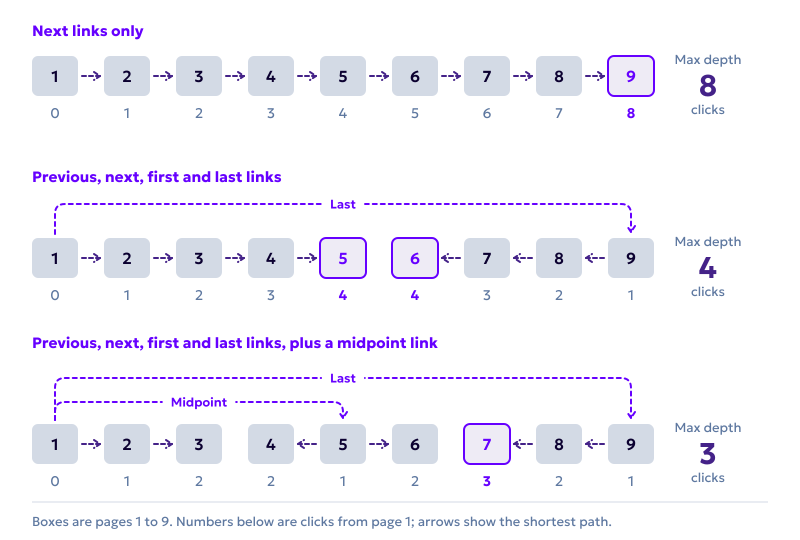
A simulated crawl experiment by Portent compared link patterns on a 200-page series. A "Last" link splits the series into two tunnels and halves the maximum depth. Patterns that add links to midpoint pages bring the maximum depth close to a logarithmic relationship with page count. The experiment measures depth on a simulated site; it does not measure Googlebot behaviour.
The design decisions that reduce depth:
- Link beyond the next page: Include first, last, neighbouring pages, and some intermediate pages.
- Increase page size: 48 items per page gives half as many pages as 24.
- Split long listings: Subcategories and indexable facets give items a shorter route than page 30 of a parent category.
- Provide a second route: Google recommends a sitemap or a Merchant Center feed so that product discovery does not depend on pagination alone. See Internal linking architecture for other link patterns.
Listing order also matters. When new items are added at the top of a list, every item moves down and page boundaries move with them. The content of ?page=7 is not stable, which is one more reason to treat later pages as crawl paths and not as landing pages.
Load more and infinite scroll
"Load more" buttons and infinite scroll replace page links with JavaScript that appends items. Because Googlebot does not click and does not scroll as a user does, items beyond the first batch are invisible unless a crawlable equivalent exists.
The requirements are the same as for classic pagination:
- A URL for each batch: Each increment corresponds to a paginated URL that returns that batch when requested directly.
- Crawlable links: The page includes
<a href>links to those URLs. A "load more" control can be an anchor that JavaScript enhances. - No fragments:
/widgets/blue#page=2is not a separate URL for Google. The documentation states that fragments are ignored for page numbers.
Many AI crawlers do not execute JavaScript at all, so content that appears only after a click or a scroll is absent for them as well. See AI crawlers and JavaScript and JavaScript SEO.
Diagnosing pagination problems
Search Console Page indexing report: Filter the report by the page parameter. "Alternate page with proper canonical tag" is the expected status for ?page=1. The same status on ?page=2 and later means the template points those pages at another URL. "Duplicate, Google chose different canonical than user" on later pages means Google merged them in spite of a self-referencing tag; compare the pages to see how much of their content is unique. "Soft 404" on paginated URLs points to out-of-range pages that return a 200 status.
URL Inspection: Compare the user-declared canonical with the Google-selected canonical for a sample of deep pages.
Crawl data: A site crawl shows the click depth of paginated URLs and of the items linked only from them. It also shows internal links to ?page=1. Check paginated URLs for noindex in both the robots meta tag and the X-Robots-Tag HTTP header; a directive in the header does not appear in the page source. Duplicate title warnings on paginated URLs in the same crawl are expected and need no action.
Log files: Server logs show how deep Googlebot goes into each series and how often. A sharp fall in requests after the first few pages indicates a depth problem. See Log file analysis for technical SEO.
Common implementation errors
- All pages canonical to the first page: The query string is removed from every canonical tag, so the page parameter is lost with the tracking parameters.
- Self-canonical
?page=1: The first page exists at two indexable URLs, and internal links from page 2 point to the parameter version. - Canonical and noindex together on later pages: The two signals conflict. Choose one treatment for each URL pattern.
- Empty pages with a 200 status: Out-of-range and invalid page values return a normal response.
- Pagination that needs JavaScript: Page links are buttons or click handlers with no
href. - Nofollow on pagination links: A
rel="nofollow"attribute on page links, or a page-level nofollow directive on later pages, weakens the same crawl path as a robots.txt block. - Blocked series with unique items: Robots.txt stops the crawl of later pages, and no other route leads to the items on them.
- Canonical across series: A filtered or sorted page 2 points to the unfiltered page 2, which shows different items.
Key takeaways
- Two canonical rules, not one:
?page=1duplicates the clean URL and consolidates to it. Page 2 and every later page is a different document and is self-canonical. - Later pages are crawl paths: They do not need to rank, but they must stay crawlable while they are the only route to the items they list. Very large marketplaces can keep deep filtered pages out of the crawl (robots.txt or fragment-based pagination; noindex does not save crawl requests), but only when every item has another route.
- Handle every parameter value: Out-of-range, zero, and malformed page values need a 404 or a redirect, not a 200 response.
- Pagination follows its base listing: An indexable facet gets its own self-canonical series. The series of a blocked or noindexed filter gets the same treatment as that filter.
- Links carry the series: Google uses
<a href>links, not buttons or fragments. The link pattern in the pagination component sets the click depth of the series.
Further reading
- Google: Pagination, incremental page loading, and their impact on Google Search
Official best practices for paginated URLs, canonical tags, and load-more patterns - Google: View-all in search results
The 2011 explanation of why a view-all page is a valid canonical target and page 1 is not - Search Engine Journal: Google Shares Guidance on Pagination for SEO
John Mueller's comments on canonical tags in paginated series - Search Engine Roundtable: Long Term Noindex Will Lead To Nofollow On Links
Mueller's 2017 statement on links from noindexed pages - Google: Large site owner's guide to managing crawl budget
Why noindexed URLs still use crawl requests, and when to use robots.txt - Google: Managing crawling of faceted navigation URLs
Robots.txt and URL fragments as ways to keep filter states out of crawling - Portent: How Site Pagination and Click Depth Affect SEO
Simulated crawl experiment that compares pagination link patterns